
Background
For a long time, my Moonglade blog had a single, fairly long PowerShell script that did everything from prompting for subscription and region, to generate random names and passwords, then create App Service Plan, Web App, SQL Server, SQL Database, Storage Account, and finally configure connection strings and app settings.
It worked. But it was also doing two very different jobs in one place.
In this post, I’ll walk through how I refactored that into a PowerShell script focused on orchestration and UX, and a Bicep template that declaratively defines the Azure resources.
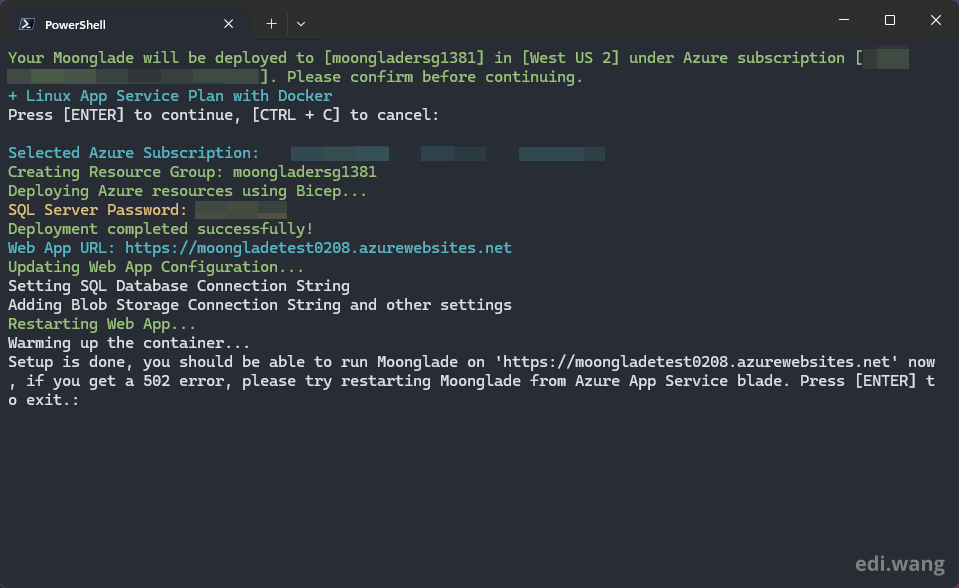
What Changed
Before: One big PowerShell script
The original script did everything through Azure CLI calls:
az group create
az appservice plan create
az sql server create
az sql db create
az storage account create
az webapp create
az webapp config ...
az sql server firewall-rule create
All resource definitions were embedded in PowerShell functions like Create-SqlServer, Create-SqlDatabase, Create-StorageAccount, Create-WebApp, etc.
It also did the interactive part. Like checking if az is installed, logging in / listing subscriptions, asking for region and web app name, etc.
Everything was imperative and driven by CLI operations.
After: PowerShell orchestration + Bicep deployment
The new approach splits responsibilities. PowerShell script still handles these tasks:
- Azure CLI check + login
- Subscription selection
- Region selection (now with a nice arrow-key menu)
- Web app name validation
- Random name/password generation
- Confirmation
- Creates only the resource group with
az group create - Then calls
az deployment groupcreate withmain.bicep
After Bicep finishes, PowerShell:
- Reads Bicep outputs (webAppUrl, sqlServerFqdn)
- Builds the SQL connection string
- Retrieves the storage connection string
- Configures web app connection strings and app settings
- Restarts the Web App
Bicep template (main.bicep) defines:
- App Service Plan
- SQL Server
- SQL Database
- SQL firewall rule
- Storage Account
- Web App (with Docker image and basic app settings)
- Returns
webAppUrlandsqlServerFqdn
Why I Did This
There are three main reasons.
1. Declarative infrastructure is easier to reason about
In the original script, if you wanted to know what was being deployed, you had to read through multiple PowerShell functions and CLI calls like this:
function Create-SqlServer($sqlServerName, $rsgName, $regionName, $sqlServerUsername, $sqlServerPassword) {
    $sqlServerCheck = az sql server list --query "[?name=='$sqlServerName']" | ConvertFrom-Json
    $sqlServerExists = $sqlServerCheck.Length -gt 0
    if (!$sqlServerExists) {
        az sql server create --name $sqlServerName --resource-group $rsgName --location $regionName --admin-user $sqlServerUsername --admin-password $sqlServerPassword | Out-Null
        az sql server firewall-rule create --resource-group $rsgName --server $sqlServerName --name AllowAllIps --start-ip-address 0.0.0.0 --end-ip-address 0.0.0.0 | Out-Null
    }
}
The actual desired state (one SQL Server + default firewall rule) was buried in logic and conditionals. But with Bicep, the same thing becomes declarative:
resource sqlServer 'Microsoft.Sql/servers@2022-05-01-preview' = {
  name: sqlServerName
  location: location
  properties: {
    administratorLogin: sqlAdminUsername
    administratorLoginPassword: sqlAdminPassword
    version: '12.0'
  }
}

resource sqlFirewallRule 'Microsoft.Sql/servers/firewallRules@2022-05-01-preview' = {
  parent: sqlServer
  name: 'AllowAllAzureIps'
  properties: {
    startIpAddress: '0.0.0.0'
    endIpAddress: '0.0.0.0'
  }
}
No "check if exists", no imperative flow. I simply declare what I want, and Bicep/ARM handles how to get there. This makes it easier to review, diff, and maintain over time.
2. Separation of concerns and better tooling
Splitting responsibilities gives some nice benefits.
UX logic stays in PowerShell, like arrow-key menu for regions, input validation for web app name, and confirmation prompts.
While infrastructure is in Bicep, it has strongly-typed resources, IntelliSense in VS Code, parameter validation (@minLength, @maxLength) and ARM deployment history in the portal.
For example, Bicep now validates name constraints right in the template:
@description('The name of the Storage Account')
@minLength(3)
@maxLength(24)
param storageAccountName string
And I still get to keep a nice interactive installer in PowerShell, now improved with a small arrow-key menu:
$azureRegions = @(
    "Australia Central",
    "Australia East",
    ...
    "West US 3"
)

$defaultIndex = [array]::IndexOf($azureRegions, $defaultRegion)
if ($defaultIndex -eq -1) { $defaultIndex = 0 }

$regionName = Show-Menu -Title "Select Azure Region:" -Options $azureRegions -DefaultIndex $defaultIndex
Write-Host "Selected region: $regionName" -ForegroundColor Cyan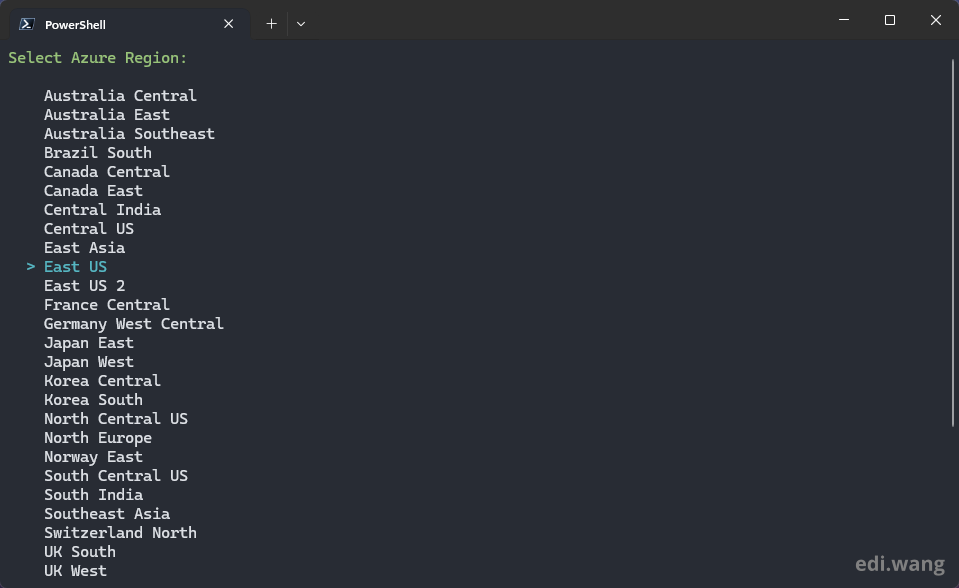
3. Reusability and portability
With Bicep, I can deploy the same infrastructure using just a simple command:
az deployment group create \
  --resource-group my-rg \
  --template-file main.bicep \
  --parameters webAppName=... ...
I can plug this into GitHub Actions, Azure DevOps and Other CI/CD pipelines. The PowerShell script is now just one client of the Bicep template.
The Complete Code
Old PowerShell Script
param(
    [string] $defaultRegion = "West US",
    [switch] $preRelease = $false
)
function Get-UrlStatusCode([string] $Url) {
    try {
        [System.Net.WebRequest]::Create($Url).GetResponse().StatusCode
    }
    catch [Net.WebException] {
        [int]$_.Exception.Response.StatusCode
    }
}
function Check-Command($cmdname) {
    return [bool](Get-Command -Name $cmdname -ErrorAction SilentlyContinue)
}
function Get-RandomCharacters($length, $characters) {
    $random = 1..$length | ForEach-Object { Get-Random -Maximum $characters.length }
    $private:ofs = ""
    return [String]$characters[$random]
}
function Scramble-String([string]$inputString) {
    $characterArray = $inputString.ToCharArray()
    $scrambledStringArray = $characterArray | Get-Random -Count $characterArray.Length
    $outputString = -join $scrambledStringArray
    return $outputString
}
function Create-ResourceGroup($rsgName, $regionName) {
    $rsgExists = az group exists -n $rsgName
    if ($rsgExists -eq 'false') {
        Write-Host "Creating Resource Group"
        az group create -l $regionName -n $rsgName | Out-Null
    }
}
function Create-AppServicePlan($aspName, $rsgName, $regionName) {
    $planCheck = az appservice plan list --query "[?name=='$aspName']" | ConvertFrom-Json
    $planExists = $planCheck.Length -gt 0
    if (!$planExists) {
        az appservice plan create -n $aspName -g $rsgName --is-linux --sku P0V3 --location $regionName | Out-Null
    }
}
function Create-SqlServer($sqlServerName, $rsgName, $regionName, $sqlServerUsername, $sqlServerPassword) {
    $sqlServerCheck = az sql server list --query "[?name=='$sqlServerName']" | ConvertFrom-Json
    $sqlServerExists = $sqlServerCheck.Length -gt 0
    if (!$sqlServerExists) {
        Write-Host "Creating SQL Server"
        az sql server create --name $sqlServerName --resource-group $rsgName --location $regionName --admin-user $sqlServerUsername --admin-password $sqlServerPassword | Out-Null
        Write-Host "SQL Server Password: $sqlServerPassword" -ForegroundColor Yellow
        Write-Host "Setting Firewall to Allow Azure Connection"
        az sql server firewall-rule create --resource-group $rsgName --server $sqlServerName --name AllowAllIps --start-ip-address 0.0.0.0 --end-ip-address 0.0.0.0 | Out-Null
    }
}
function Create-SqlDatabase($sqlDatabaseName, $rsgName, $sqlServerName) {
    $sqlDbCheck = az sql db list --resource-group $rsgName --server $sqlServerName --query "[?name=='$sqlDatabaseName']" | ConvertFrom-Json
    $sqlDbExists = $sqlDbCheck.Length -gt 0
    if (!$sqlDbExists) {
        Write-Host "Creating SQL Database"
        az sql db create --resource-group $rsgName --server $sqlServerName --name $sqlDatabaseName --service-objective S0 --backup-storage-redundancy Local | Out-Null
    }
}
function Create-StorageAccount($storageAccountName, $rsgName, $regionName) {
    $storageAccountCheck = az storage account list --query "[?name=='$storageAccountName']" | ConvertFrom-Json
    $storageAccountExists = $storageAccountCheck.Length -gt 0
    if (!$storageAccountExists) {
        Write-Host "Creating Storage Account"
        az storage account create --name $storageAccountName --resource-group $rsgName --location $regionName --sku Standard_LRS --kind StorageV2 --allow-blob-public-access true | Out-Null
    }
}
function Create-WebApp($webAppName, $rsgName, $aspName, $dockerImageName) {
    $appCheck = az webapp list --query "[?name=='$webAppName']" | ConvertFrom-Json
    $appExists = $appCheck.Length -gt 0
    if (!$appExists) {
        Write-Host "Creating Web App"
        Write-Host "Using Linux Plan with Docker image from '$dockerImageName'."
        az webapp create -g $rsgName -p $aspName -n $webAppName --container-image-name $dockerImageName | Out-Null
        az webapp config set -g $rsgName -n $webAppName --always-on true --use-32bit-worker-process false --http20-enabled true | Out-Null
    }
}
function Update-WebAppConfig($webAppName, $rsgName, $sqlConnStr, $storageConn) {
    Write-Host "Updating Configuration" -ForegroundColor Green
    Write-Host "Setting SQL Database Connection String"
    az webapp config connection-string set -g $rsgName -n $webAppName -t SQLAzure --settings MoongladeDatabase=$sqlConnStr
    Write-Host "Adding Blob Storage Connection String"
    $scon = $storageConn.connectionString
    az webapp config appsettings set -g $rsgName -n $webAppName --settings ImageStorage__Provider=azurestorage  | Out-Null
    az webapp config appsettings set -g $rsgName -n $webAppName --settings ImageStorage__AzureStorageSettings__ConnectionString=$scon | Out-Null
    az webapp config appsettings set -g $rsgName -n $webAppName --settings ASPNETCORE_FORWARDEDHEADERS_ENABLED=true | Out-Null
}
# Main script starts here
[Console]::ResetColor()
if (-not (Check-Command -cmdname 'az')) {
    Invoke-WebRequest -Uri https://aka.ms/installazurecliwindows -OutFile .\AzureCLI.msi
    Start-Process msiexec.exe -Wait -ArgumentList '/I AzureCLI.msi /quiet'
    Write-Host "Please run 'az-login' and re-execute this script"
    return
}
# Login and select subscription
$output = az account show -o json | ConvertFrom-Json
$subscriptionList = az account list -o json | ConvertFrom-Json
$subscriptionList | Format-Table name, id, tenantId -AutoSize
$subscriptionName = $output.name
Write-Host "Currently logged in to subscription """$output.name.Trim()""" in tenant " $output.tenantId
$subscriptionName = Read-Host "Enter subscription Id ("$output.id")"
$subscriptionName = $subscriptionName.Trim()
if ([string]::IsNullOrWhiteSpace($subscriptionName)) {
    $subscriptionName = $output.id
}
else {
    Write-Host "Changed to subscription ("$subscriptionName")"
}
# Select region
$regionName = Read-Host "Enter region name (default: $defaultRegion)"
if ([string]::IsNullOrWhiteSpace($regionName)) {
    $regionName = $defaultRegion
}
else {
    $regionName = $regionName.Trim()
}
# Select web app name
while ($true) {
    $webAppName = Read-Host -Prompt "Enter webapp name"
    $webAppName = $webAppName.Trim()
    $keywords = @("xbox", "windows", "login", "microsoft")
    if ($keywords -contains $webAppName.ToLower()) {
        Write-Host "Webapp name cannot have keywords xbox, windows, login, microsoft"
        continue
    }
    $HTTP_Status = Get-UrlStatusCode('https://' + $webAppName + '.azurewebsites.net')
    if ($HTTP_Status -eq 0) {
        break
    }
    else {
        Write-Host "Webapp name taken"
    }
}
# Generate random names and passwords
$rndNumber = Get-Random -Minimum 1000 -Maximum 9999
$rsgName = "moongladersg$rndNumber"
$aspName = "moongladeplan$rndNumber"
$storageAccountName = "moongladestorage$rndNumber"
$sqlServerUsername = "moonglade"
$sqlServerName = "moongladesql$rndNumber"
$sqlDatabaseName = "moongladedb$rndNumber"
$password = Get-RandomCharacters -length 5 -characters 'abcdefghiklmnoprstuvwxyz'
$password += Get-RandomCharacters -length 1 -characters 'ABCDEFGHKLMNOPRSTUVWXYZ'
$password += Get-RandomCharacters -length 1 -characters '1234567890'
$password += Get-RandomCharacters -length 1 -characters '!$%@#'
$password = Scramble-String $password
$sqlServerPassword = "m$password"
# Set docker image name based on pre-release flag
if ($preRelease) {
    $dockerImageName = "ediwang/moonglade:preview"
}
else {
    $dockerImageName = "ediwang/moonglade"
}
# Confirmation
Clear-Host
Write-Host "Your Moonglade will be deployed to [$rsgName] in [$regionName] under Azure subscription [$subscriptionName]. Please confirm before continuing." -ForegroundColor Green
Write-Host "+ Linux App Service Plan with Docker" -ForegroundColor Cyan
Read-Host -Prompt "Press [ENTER] to continue, [CTRL + C] to cancel"
# Set subscription
az account set --subscription $subscriptionName
Write-Host "Selected Azure Subscription: " $subscriptionName -ForegroundColor Cyan
# Create resources
Create-ResourceGroup $rsgName $regionName
Create-AppServicePlan $aspName $rsgName $regionName
Create-SqlServer $sqlServerName $rsgName $regionName $sqlServerUsername $sqlServerPassword
Create-SqlDatabase $sqlDatabaseName $rsgName $sqlServerName
Create-StorageAccount $storageAccountName $rsgName $regionName
$storageConn = az storage account show-connection-string -g $rsgName -n $storageAccountName | ConvertFrom-Json
Create-WebApp $webAppName $rsgName $aspName $dockerImageName
$createdApp = az webapp list --query "[?name=='$webAppName']" | ConvertFrom-Json
$createdExists = $createdApp.Length -gt 0
if ($createdExists) {
    $webAppUrl = "https://" + $createdApp.defaultHostName
    Write-Host "Web App URL: $webAppUrl"
}
# Update configuration
$sqlConnStrTemplate = az sql db show-connection-string -s $sqlServerName -n $sqlDatabaseName -c ado.net --auth-type SqlPassword
$sqlConnStr = $sqlConnStrTemplate.Replace("<username>", $sqlServerUsername).Replace("<password>", $sqlServerPassword)
Update-WebAppConfig $webAppName $rsgName $sqlConnStr $storageConn
az webapp restart --name $webAppName --resource-group $rsgName | Out-Null
Write-Host "Warming up the container..."
Start-Sleep -Seconds 20
Read-Host -Prompt "Setup is done, you should be able to run Moonglade on '$webAppUrl' now, if you get a 502 error, please try restarting Moonglade from Azure App Service blade. Press [ENTER] to exit."
New PowerShell Script
param(
    [string] $defaultRegion = "West US",
    [switch] $preRelease = $false
)
function Get-UrlStatusCode([string] $Url) {
    try {
        [System.Net.WebRequest]::Create($Url).GetResponse().StatusCode
    }
    catch [Net.WebException] {
        [int]$_.Exception.Response.StatusCode
    }
}
function Check-Command($cmdname) {
    return [bool](Get-Command -Name $cmdname -ErrorAction SilentlyContinue)
}
function Get-RandomCharacters($length, $characters) {
    $random = 1..$length | ForEach-Object { Get-Random -Maximum $characters.length }
    $private:ofs = ""
    return [String]$characters[$random]
}
function Scramble-String([string]$inputString) {
    $characterArray = $inputString.ToCharArray()
    $scrambledStringArray = $characterArray | Get-Random -Count $characterArray.Length
    $outputString = -join $scrambledStringArray
    return $outputString
}
function Show-Menu {
    param (
        [string]$Title,
        [string[]]$Options,
        [int]$DefaultIndex = 0
    )

    $selectedIndex = $DefaultIndex
    $cursorVisible = [Console]::CursorVisible
    [Console]::CursorVisible = $false

    try {
        while ($true) {
            Clear-Host
            Write-Host $Title -ForegroundColor Green
            Write-Host ""

            for ($i = 0; $i -lt $Options.Length; $i++) {
                if ($i -eq $selectedIndex) {
                    Write-Host "  > $($Options[$i])" -ForegroundColor Cyan
                } else {
                    Write-Host "    $($Options[$i])"
                }
            }

            Write-Host ""
            Write-Host "Use arrow keys to select, press Enter to confirm" -ForegroundColor Gray

            $key = $Host.UI.RawUI.ReadKey("NoEcho,IncludeKeyDown")

            switch ($key.VirtualKeyCode) {
                38 { # Up arrow
                    $selectedIndex = [Math]::Max(0, $selectedIndex - 1)
                }
                40 { # Down arrow
                    $selectedIndex = [Math]::Min($Options.Length - 1, $selectedIndex + 1)
                }
                13 { # Enter
                    return $Options[$selectedIndex]
                }
            }
        }
    }
    finally {
        [Console]::CursorVisible = $cursorVisible
    }
}
# Main script starts here
[Console]::ResetColor()
if (-not (Check-Command -cmdname 'az')) {
    Invoke-WebRequest -Uri https://aka.ms/installazurecliwindows -OutFile .\AzureCLI.msi
    Start-Process msiexec.exe -Wait -ArgumentList '/I AzureCLI.msi /quiet'
    Write-Host "Please run 'az-login' and re-execute this script"
    return
}
# Login and select subscription
$output = az account show -o json | ConvertFrom-Json
$subscriptionList = az account list -o json | ConvertFrom-Json
$subscriptionList | Format-Table name, id, tenantId -AutoSize
$subscriptionName = $output.name
Write-Host "Currently logged in to subscription """$output.name.Trim()""" in tenant " $output.tenantId
$subscriptionName = Read-Host "Enter subscription Id ("$output.id")"
$subscriptionName = $subscriptionName.Trim()
if ([string]::IsNullOrWhiteSpace($subscriptionName)) {
    $subscriptionName = $output.id
}
else {
    Write-Host "Changed to subscription ("$subscriptionName")"
}
# Select region
$azureRegions = @(
    "Australia Central",
    "Australia East",
    "Australia Southeast",
    "Brazil South",
    "Canada Central",
    "Canada East",
    "Central India",
    "Central US",
    "East Asia",
    "East US",
    "East US 2",
    "France Central",
    "Germany West Central",
    "Japan East",
    "Japan West",
    "Korea Central",
    "Korea South",
    "North Central US",
    "North Europe",
    "Norway East",
    "South Central US",
    "South India",
    "Southeast Asia",
    "Switzerland North",
    "UK South",
    "UK West",
    "West Central US",
    "West Europe",
    "West India",
    "West US",
    "West US 2",
    "West US 3"
)
$defaultIndex = [array]::IndexOf($azureRegions, $defaultRegion)
if ($defaultIndex -eq -1) { $defaultIndex = 0 }
$regionName = Show-Menu -Title "Select Azure Region:" -Options $azureRegions -DefaultIndex $defaultIndex
Write-Host "Selected region: $regionName" -ForegroundColor Cyan
Start-Sleep -Seconds 1
# Select web app name
while ($true) {
    $webAppName = Read-Host -Prompt "Enter webapp name"
    $webAppName = $webAppName.Trim()
    $keywords = @("xbox", "windows", "login", "microsoft")
    if ($keywords -contains $webAppName.ToLower()) {
        Write-Host "Webapp name cannot have keywords xbox, windows, login, microsoft"
        continue
    }
    $HTTP_Status = Get-UrlStatusCode('https://' + $webAppName + '.azurewebsites.net')
    if ($HTTP_Status -eq 0) {
        break
    }
    else {
        Write-Host "Webapp name taken"
    }
}
# Generate random names and passwords
$rndNumber = Get-Random -Minimum 1000 -Maximum 9999
$rsgName = "moongladersg$rndNumber"
$aspName = "moongladeplan$rndNumber"
$storageAccountName = "moongladestorage$rndNumber"
$sqlServerUsername = "moonglade"
$sqlServerName = "moongladesql$rndNumber"
$sqlDatabaseName = "moongladedb$rndNumber"
$password = Get-RandomCharacters -length 5 -characters 'abcdefghiklmnoprstuvwxyz'
$password += Get-RandomCharacters -length 1 -characters 'ABCDEFGHKLMNOPRSTUVWXYZ'
$password += Get-RandomCharacters -length 1 -characters '1234567890'
$password += Get-RandomCharacters -length 1 -characters '!$%@#'
$password = Scramble-String $password
$sqlServerPassword = "m$password"
# Set docker image name based on pre-release flag
if ($preRelease) {
    $dockerImageName = "ediwang/moonglade:preview"
}
else {
    $dockerImageName = "ediwang/moonglade"
}
# Confirmation
Clear-Host
Write-Host "Your Moonglade will be deployed to [$rsgName] in [$regionName] under Azure subscription [$subscriptionName]. Please confirm before continuing." -ForegroundColor Green
Write-Host "+ Linux App Service Plan with Docker" -ForegroundColor Cyan
Read-Host -Prompt "Press [ENTER] to continue, [CTRL + C] to cancel"
# Set subscription
az account set --subscription $subscriptionName
Write-Host "Selected Azure Subscription: " $subscriptionName -ForegroundColor Cyan
# Create Resource Group
Write-Host "Creating Resource Group: $rsgName" -ForegroundColor Green
$rsgExists = az group exists -n $rsgName
if ($rsgExists -eq 'false') {
    az group create -l $regionName -n $rsgName | Out-Null
}
# Get Bicep file path
$bicepFilePath = Join-Path $PSScriptRoot "main.bicep"
# Deploy using Bicep
Write-Host "Deploying Azure resources using Bicep..." -ForegroundColor Green
Write-Host "SQL Server Password: $sqlServerPassword" -ForegroundColor Yellow
$deploymentName = "moonglade-deployment-$(Get-Date -Format 'yyyyMMddHHmmss')"
$deploymentOutput = az deployment group create `
    --resource-group $rsgName `
    --name $deploymentName `
    --template-file $bicepFilePath `
    --parameters `
        webAppName=$webAppName `
        appServicePlanName=$aspName `
        sqlServerName=$sqlServerName `
        sqlDatabaseName=$sqlDatabaseName `
        storageAccountName=$storageAccountName `
        sqlAdminUsername=$sqlServerUsername `
        sqlAdminPassword=$sqlServerPassword `
        dockerImageName=$dockerImageName `
        location=$regionName `
    --output json | ConvertFrom-Json
if ($null -eq $deploymentOutput) {
    Write-Host "Deployment failed. Please check the error messages above." -ForegroundColor Red
    return
}
Write-Host "Deployment completed successfully!" -ForegroundColor Green
# Get outputs from Bicep deployment
$webAppUrl = $deploymentOutput.properties.outputs.webAppUrl.value
$sqlServerFqdn = $deploymentOutput.properties.outputs.sqlServerFqdn.value
# Build SQL connection string from known variables
$sqlConnStr = "Server=tcp:${sqlServerFqdn},1433;Initial Catalog=${sqlDatabaseName};Persist Security Info=False;User ID=${sqlServerUsername};Password=${sqlServerPassword};MultipleActiveResultSets=False;Encrypt=True;TrustServerCertificate=False;Connection Timeout=30;"
# Retrieve storage connection string securely
$storageConnStr = az storage account show-connection-string -g $rsgName -n $storageAccountName --query connectionString -o tsv
Write-Host "Web App URL: $webAppUrl" -ForegroundColor Cyan
# Update Web App Configuration
Write-Host "Updating Web App Configuration..." -ForegroundColor Green
Write-Host "Setting SQL Database Connection String"
az webapp config connection-string set -g $rsgName -n $webAppName -t SQLAzure --settings MoongladeDatabase=$sqlConnStr | Out-Null
Write-Host "Adding Blob Storage Connection String and other settings"
az webapp config appsettings set -g $rsgName -n $webAppName --settings `
    ImageStorage__Provider=azurestorage `
    ImageStorage__AzureStorageSettings__ConnectionString=$storageConnStr `
    ASPNETCORE_FORWARDEDHEADERS_ENABLED=true | Out-Null
# Restart Web App
Write-Host "Restarting Web App..." -ForegroundColor Green
az webapp restart --name $webAppName --resource-group $rsgName | Out-Null
Write-Host "Warming up the container..."
Start-Sleep -Seconds 20
Read-Host -Prompt "Setup is done, you should be able to run Moonglade on '$webAppUrl' now, if you get a 502 error, please try restarting Moonglade from Azure App Service blade. Press [ENTER] to exit."
New Bicep File
@description('The name of the web app')
param webAppName string
@description('The name of the App Service Plan')
param appServicePlanName string
@description('The name of the SQL Server')
@minLength(1)
@maxLength(63)
param sqlServerName string
@description('The name of the SQL Database')
param sqlDatabaseName string
@description('The name of the Storage Account')
@minLength(3)
@maxLength(24)
param storageAccountName string
@description('SQL Server admin username')
param sqlAdminUsername string
@description('SQL Server admin password')
@secure()
param sqlAdminPassword string
@description('Docker image name')
param dockerImageName string
@description('Location for all resources')
param location string = resourceGroup().location
// App Service Plan
resource appServicePlan 'Microsoft.Web/serverfarms@2022-03-01' = {
  name: appServicePlanName
  location: location
  sku: {
    name: 'P0v3'
    tier: 'Premium0V3'
  }
  kind: 'linux'
  properties: {
    reserved: true
  }
}
// SQL Server
resource sqlServer 'Microsoft.Sql/servers@2022-05-01-preview' = {
  name: sqlServerName
  location: location
  properties: {
    administratorLogin: sqlAdminUsername
    administratorLoginPassword: sqlAdminPassword
    version: '12.0'
  }
}
// SQL Database
resource sqlDatabase 'Microsoft.Sql/servers/databases@2022-05-01-preview' = {
  parent: sqlServer
  name: sqlDatabaseName
  location: location
  sku: {
    name: 'S0'
    tier: 'Standard'
  }
  properties: {
    collation: 'SQL_Latin1_General_CP1_CI_AS'
    requestedBackupStorageRedundancy: 'Local'
  }
}
// SQL Firewall Rule - Allow Azure Services
resource sqlFirewallRule 'Microsoft.Sql/servers/firewallRules@2022-05-01-preview' = {
  parent: sqlServer
  name: 'AllowAllAzureIps'
  properties: {
    startIpAddress: '0.0.0.0'
    endIpAddress: '0.0.0.0'
  }
}
// Storage Account
resource storageAccount 'Microsoft.Storage/storageAccounts@2022-09-01' = {
  name: storageAccountName
  location: location
  sku: {
    name: 'Standard_LRS'
  }
  kind: 'StorageV2'
  properties: {
    allowBlobPublicAccess: true
    supportsHttpsTrafficOnly: true
  }
}
// Web App
resource webApp 'Microsoft.Web/sites@2022-03-01' = {
  name: webAppName
  location: location
  properties: {
    serverFarmId: appServicePlan.id
    siteConfig: {
      linuxFxVersion: 'DOCKER|${dockerImageName}'
      alwaysOn: true
      use32BitWorkerProcess: false
      http20Enabled: true
      appSettings: [
        {
          name: 'WEBSITES_ENABLE_APP_SERVICE_STORAGE'
          value: 'false'
        }
        {
          name: 'DOCKER_REGISTRY_SERVER_URL'
          value: 'https://index.docker.io'
        }
      ]
    }
    httpsOnly: true
  }
}
// Outputs
output webAppUrl string = 'https://${webApp.properties.defaultHostName}'
output sqlServerFqdn string = sqlServer.properties.fullyQualifiedDomainName
Conclusion
I refactored my Azure deployment script with Bicep. The changes are:
- Moved resource creation from imperative Azure CLI calls in PowerShell into a Bicep template.
- Kept user experience, validation, and orchestration in PowerShell.
- Used Bicep outputs to wire up connection strings and URLs in PowerShell.
This pattern (PowerShell/Bash for orchestration + Bicep for infrastructure) scales much better than a single giant script, especially as you add more resources, environments, or CI/CD!
Comments