When you host a virtual machine in the cloud, one of the simplest ways to reduce its attack surface is to keep management ports locked down to trusted source IP addresses. For example, SSH, database access, and private service endpoints should usually not be open to the entire internet.
That approach works well when your trusted locations have static public IP addresses. It becomes less pleasant when those locations use dynamic residential or office broadband connections. The public IP can change at any time, and when it does, the NSG rule that used to protect access becomes stale. The next login attempt fails until someone manually updates the source IP in Azure.
This project solves that small but annoying operational problem with a lightweight Docker container. It periodically resolves a set of DDNS hostnames, compares the current IP addresses with the source IPs configured in Azure Network Security Group rules, and updates only the rules that need to change.
Source Code
Repo: https://github.com/EdiWang/Azure-NSG-Updater
You may need to build your own Docker image, because I haven't push this to public Docker registries yet.
The Scenario
The target environment is a virtual machine running in Azure China. The VM is protected by an NSG with several inbound allow rules for administrative and private service access.
Instead of allowing broad internet access, each rule is restricted to a trusted remote location. Those remote locations publish their current public IP addresses through DDNS hostnames such as:
host01.ddns.com
host02.ddns.com
The NSG contains matching rules like:
SSH_HOST01
SSH_HOST02
MSSQL_HOST01
MSSQL_HOST02
The job of the updater is simple:
- Resolve each DDNS hostname to its current public IPv4 address.
- Find the NSG rules associated with that hostname.
- Check the current source IP configured on each rule.
- Update the rule only when the resolved IP has changed.
- Log every decision so the container behavior is easy to observe.
Why Docker?
This kind of task does not need a full application runtime or a scheduler service. A small container is enough:
- It can run directly on the VM it protects.
- Docker Compose makes configuration and restart behavior straightforward.
- Logs are available through
docker compose logs. - The same image can be rebuilt, pushed, and reused across environments.
- Authentication and rule mappings can be supplied through environment variables.
The container runs a shell script on top of the official Azure CLI image. That keeps the implementation small while still relying on Azure's supported command-line tooling for the actual NSG updates.
Configuration Model
The project is intentionally environment-driven. The most important setting is RULE_BINDINGS, which maps each DDNS hostname to one or more NSG rule names:
RULE_BINDINGS=host01.ddns.com=SSH_HOST01,MSSQL_HOST01;host02.ddns.com=SSH_HOST02,MSSQL_HOST02
The format is:
hostname=rule1,rule2;hostname=rule3,rule4
Other key settings include:
AZURE_CLOUD=AzureChinaCloud
AUTH_MODE=managed_identity
SUBSCRIPTION_ID=<subscription-id>
RESOURCE_GROUP=<resource-group>
NSG_NAME=example-nsg
INTERVAL_SECONDS=300
DNS_TIMEOUT_SECONDS=10
DRY_RUN=false
RUN_ONCE=false
For Azure China, AZURE_CLOUD=AzureChinaCloud is important. Without it, Azure CLI would target the public Azure cloud instead of the China cloud environment.
Authentication
The recommended authentication mode is managed identity. Since the container runs on an Azure VM, there is no need to store a client secret inside the container or Compose file.
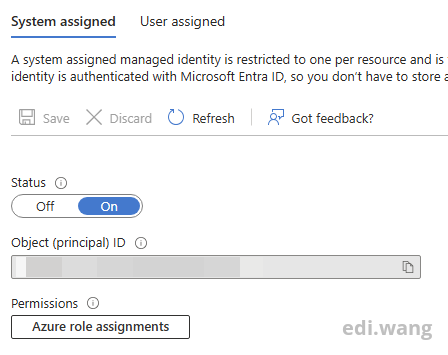
For a system-assigned managed identity, the container can log in with:
az login --identity --allow-no-subscriptions
The identity only needs enough permission to update NSG security rules. In this project, Network Contributor scoped to the target NSG is a practical choice. Scoping the role assignment to the NSG is tighter than assigning it to an entire subscription.
Docker Compose
The Compose file keeps the runtime behavior explicit:
services:
  nsg-updater:
    image: ediwang.azurecr.io/nsg-updater
    container_name: nsg-updater
    restart: unless-stopped
    env_file:
      - .env
    environment:
      AZURE_CLOUD: ${AZURE_CLOUD:-AzureChinaCloud}
      AUTH_MODE: ${AUTH_MODE:-managed_identity}
      MANAGED_IDENTITY_OBJECT_ID: ${MANAGED_IDENTITY_OBJECT_ID:-}
      RESOURCE_GROUP: ${RESOURCE_GROUP}
      NSG_NAME: ${NSG_NAME:-example-nsg}
      RULE_BINDINGS: ${RULE_BINDINGS}
      INTERVAL_SECONDS: ${INTERVAL_SECONDS:-300}
      DNS_TIMEOUT_SECONDS: ${DNS_TIMEOUT_SECONDS:-10}
      DRY_RUN: ${DRY_RUN:-false}
      RUN_ONCE: ${RUN_ONCE:-false}
      LOG_LEVEL: ${LOG_LEVEL:-info}
restart: unless-stopped is useful here. If the Azure CLI command fails because of a transient platform or network issue, Docker can restart the container and let it try again.
Resolving DDNS Safely
The updater resolves hostnames through Python's standard library instead of parsing command-line DNS output. This avoids depending on a specific Linux DNS utility being installed in the image.
The resolver only accepts public IPv4 addresses:
parsed = ipaddress.ip_address(address)
if not parsed.is_private and not parsed.is_loopback and not parsed.is_link_local and not parsed.is_multicast:
    public_addresses.append(address)
If a hostname fails to resolve, times out, or returns no public IPv4 address, the script does not update the Azure rule. This is intentional. A failed DNS lookup should not erase or weaken an existing firewall rule.
The log message makes the behavior clear:
Skipping example-hostname; existing Azure rules will be left unchanged
Updating NSG Rules
For each mapped rule, the script first reads the current source address:
az network nsg rule show \
  --resource-group "${RESOURCE_GROUP}" \
  --nsg-name "${NSG_NAME}" \
  --name "${rule_name}" \
  --query "sourceAddressPrefix || join(',', sourceAddressPrefixes || [])" \
  --output tsv
If the current source already matches the resolved IP, the rule is skipped:
if [[ "${current_source}" == "${ip_address}" || "${current_source}" == "${ip_address}/32" ]]; then
  log "info" "Rule ${rule_name} already allows ${ip_address}; skipping"
  return 0
fi
Otherwise, the rule is updated:
az network nsg rule update \
  --resource-group "${RESOURCE_GROUP}" \
  --nsg-name "${NSG_NAME}" \
  --name "${rule_name}" \
  --source-address-prefixes "${ip_address}" \
  --only-show-errors
This command updates the source address while preserving the rest of the rule configuration, including port, protocol, priority, direction, destination, and allow/deny action.
Dry Runs and One-Off Validation
Before letting the container continuously update Azure resources, it is useful to run a single dry-run cycle:
docker compose run --rm \
  -e DRY_RUN=true \
  -e RUN_ONCE=true \
  home-ip-updater
In dry-run mode, the script logs what it would change but does not call the Azure update API:
DRY_RUN: would update rule SSH_HOST01 source from 'old-ip' to 'new-ip'
This makes it easy to validate DNS resolution, identity permissions, subscription selection, resource group names, NSG names, and rule mappings before enabling continuous updates.
Observability
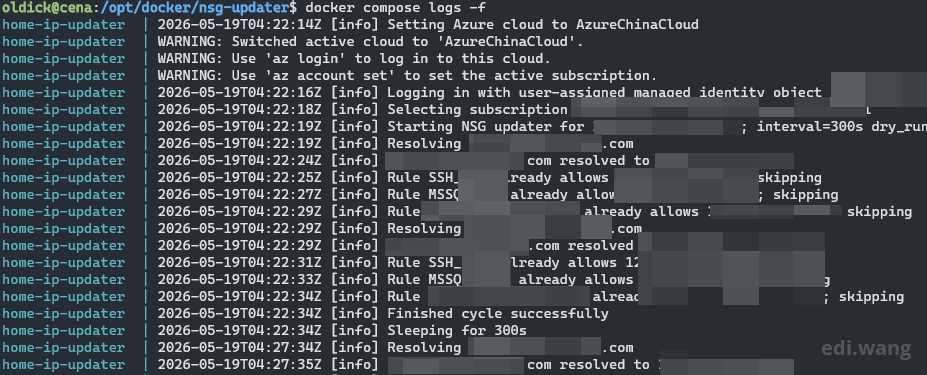
The container writes structured timestamped logs to stdout:
2026-05-19T04:15:27Z [info] Resolving host01.ddns.com
2026-05-19T04:15:27Z [info] host01.ddns.com resolved to x.x.x.x
2026-05-19T04:15:27Z [info] Rule SSH_HOST01 already allows x.x.x.x; skipping
2026-05-19T04:15:27Z [info] Finished cycle successfully
That means normal Docker tooling is enough:
docker compose logs -f
There is no database, queue, state file, or dashboard. The NSG itself is the source of truth, and the updater simply reconciles it with the current DDNS records.
Failure Handling
The implementation is deliberately conservative:
- If DNS resolution fails, no related NSG rules are changed.
- If a rule cannot be read, that rule is reported as failed.
- If a rule update fails, the error is logged and counted.
- A cycle can finish with partial failures, but successful bindings are still processed.
- Docker restart policy handles process-level failures.
This matters because firewall automation should fail closed. The script should never broaden access just because an external dependency is temporarily unavailable.
Final Thoughts
This project is a small example of practical cloud automation: not a large platform, not a complex controller, just a focused reconciliation loop around one operational pain point.
Dynamic public IP addresses are inconvenient, but DDNS plus a tiny Azure CLI container is enough to keep NSG rules current without manually editing firewall entries every time an ISP changes an address.
The result is a setup that keeps access narrow, avoids storing Azure secrets when managed identity is available, and remains easy to inspect through plain Docker logs.
Comments