When managing Azure environments with multiple subscriptions, one common question is: Which virtual machines have public IP addresses?
This sounds simple, but in Azure the relationship is not directly stored on the VM resource itself. A VM is connected to one or more network interfaces. Each network interface can have one or more IP configurations. Each IP configuration may reference a public IP address resource.
So the relationship looks like this:
Virtual Machine
  -> Network Interface
    -> IP Configuration
      -> Public IP Address
If you want to query this across all subscriptions, Azure Resource Graph is a very convenient option.
In this post, I'll show how to use Azure Resource Graph to find all Azure VMs that have public IP addresses, including the public IP address, SKU, allocation method, and IP version.
Why Azure Resource Graph?
You could get this information by iterating through subscriptions using Azure PowerShell, Azure CLI, or SDKs. That works, but it usually means multiple API calls per subscription and per resource type.
Azure Resource Graph gives us a much faster way to query Azure resource metadata at scale.
With Resource Graph, we can query resources across subscriptions using a Kusto-like query language. It is especially useful for inventory, governance, reporting, and troubleshooting scenarios.
The Query
Here is the query I use to list public IP addresses associated with Azure VMs:
resources
| where type =~ 'microsoft.compute/virtualmachines'
| extend vmId = id, vmName = name
| mv-expand nic = properties.networkProfile.networkInterfaces
| project vmId, vmName, nicId = tostring(nic.id)
| join kind=leftouter (
    resources
    | where type =~ 'microsoft.network/networkinterfaces'
    | mv-expand ipconfig = properties.ipConfigurations
    | project nicId = id, publicIpId = tostring(ipconfig.properties.publicIPAddress.id), ipConfigName = tostring(ipconfig.name)
) on nicId
| where isnotempty(publicIpId)
| join kind=leftouter (
    resources
    | where type =~ 'microsoft.network/publicipaddresses'
    | project publicIpId = id, publicIpAddress = tostring(properties.ipAddress), allocationMethod = tostring(properties.publicIPAllocationMethod), ipVersion = tostring(properties.publicIPAddressVersion), sku = tostring(sku.name)
) on publicIpId
| project vmName, vmId, ipConfigName, publicIpAddress, publicIpId, sku, allocationMethod, ipVersion
How the Query Works
Let's break it down.
First, we start from virtual machines:
resources
| where type =~ 'microsoft.compute/virtualmachines'
| extend vmId = id, vmName = name
The =~ operator is a case-insensitive comparison, which is useful when querying Azure resource types.
Then we expand the VM network interfaces:
| mv-expand nic = properties.networkProfile.networkInterfaces
| project vmId, vmName, nicId = tostring(nic.id)
A VM can have multiple NICs, so mv-expand is used to create one row per network interface.
Next, we join the VM NIC IDs with actual network interface resources:
| join kind=leftouter (
    resources
    | where type =~ 'microsoft.network/networkinterfaces'
    | mv-expand ipconfig = properties.ipConfigurations
    | project nicId = id, publicIpId = tostring(ipconfig.properties.publicIPAddress.id), ipConfigName = tostring(ipconfig.name)
) on nicId
A network interface can have multiple IP configurations. Each IP configuration may or may not have a public IP address associated with it.
After that, we filter out IP configurations that do not have a public IP address:
| where isnotempty(publicIpId)
Finally, we join with the public IP address resources to get the actual IP address and related properties:
| join kind=leftouter (
    resources
    | where type =~ 'microsoft.network/publicipaddresses'
    | project publicIpId = id, publicIpAddress = tostring(properties.ipAddress), allocationMethod = tostring(properties.publicIPAllocationMethod), ipVersion = tostring(properties.publicIPAddressVersion), sku = tostring(sku.name)
) on publicIpId
The final projection returns the columns we care about:
| project vmName, vmId, ipConfigName, publicIpAddress, publicIpId, sku, allocationMethod, ipVersion
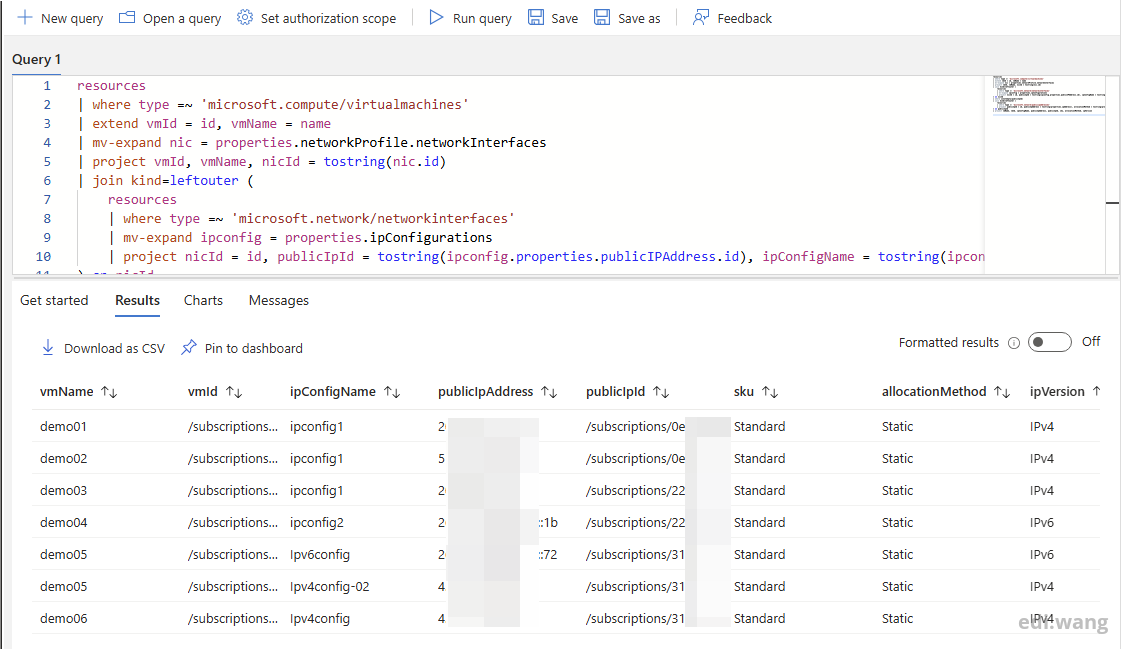
Example Output
The result will look similar to this:
| vmName | ipConfigName | publicIpAddress | sku | allocationMethod | ipVersion |
|---|---|---|---|---|---|
| vm-web-01 | ipconfig1 | 20.x.x.x | Standard | Static | IPv4 |
| vm-dev-02 | ipconfig1 | 52.x.x.x | Basic | Dynamic | IPv4 |
This gives you a quick inventory of VMs that are directly associated with public IP addresses.
Things to Keep in Mind
There are a few important points to remember.
First, this query finds VMs that have public IP addresses directly associated with their network interfaces. It does not tell you whether the VM is actually reachable from the internet. Network Security Groups, Azure Firewall, user-defined routes, load balancers, and other controls may still block inbound traffic.
Second, Azure Resource Graph is designed for querying Azure resource metadata. It is not a real-time data plane query engine. In most cases, the results are very fresh, but there can still be a short delay after resource changes.
Third, you need the right permissions. Resource Graph only returns resources that your account has permission to read.
Conclusion
Azure Resource Graph is a great tool for quickly answering inventory questions across Azure subscriptions.
With the query above, we can easily identify Azure VMs that have public IP addresses, without manually checking each VM, NIC, and IP configuration.
This is especially useful for security reviews, cloud governance, migration assessments, and regular environment cleanup.
If you manage multiple Azure subscriptions, keeping this kind of Resource Graph query in your toolbox can save a lot of time.
Comments