Image storage sounds simple: accept an upload, save the bytes, and return a URL. In practice, it can quickly pull cloud SDKs, credentials, provider-specific configuration, deployment logic, and operational assumptions deep into an application.
That was the situation in Moonglade. It supported the local filesystem, Azure Blob Storage, and S3-compatible object storage directly in the application. This worked, but each provider made the application responsible for more infrastructure knowledge.
In PR #999, I redesigned this subsystem around a simpler principle:
Moonglade should manage image files. The hosting environment should decide how those files are persisted.
The result is a filesystem-only application architecture that can still run on Azure, Docker, traditional servers, shared network storage, or other platforms.
The Previous Architecture
Moonglade already had an IBlogImageStorage abstraction, so most business code did not directly call Azure or AWS APIs. However, the application still contained three separate implementations:
- Local filesystem storage
- Azure Blob Storage
- S3-compatible storage
The dependency injection layer selected one of them based on configuration:
Moonglade
    └── IBlogImageStorage
          ├── FileSystemImageStorage
          ├── AzureBlobImageStorage
          └── S3CompatibleImageStorage
This meant the application still needed to understand:
- Azure Storage connection strings and container names
- S3 endpoints, regions, buckets, and access keys
- Azure and AWS SDK initialization
- Provider-specific validation
- Remote container creation during startup
- Different behaviors and test suites for each provider
Although image consumers depended on an interface, the application as a whole remained coupled to specific storage platforms.
Adding another provider would have required another implementation, another SDK, more configuration, and more tests. That was not the direction I wanted for a personal blogging platform.
A New Responsibility Boundary
The redesigned architecture removes cloud storage providers from the application entirely:
Moonglade
    ↓
IBlogImageStorage
    ↓
Filesystem paths
    ↓
Local disk / Docker volume / Azure Files / SMB / NFS / mounted storage
Moonglade now reads and writes ordinary files. Durability, replication, sharing, backup, and cloud integration belong to the deployment environment.
This does not mean Moonglade can no longer use cloud storage. It means cloud storage is attached below the application boundary.
For example, the official Azure deployment mounts Azure Files shares into the Linux App Service container. Moonglade sees /app/images, while Azure provides durable storage behind that path. No Azure Storage SDK is required in the application.
A Smaller Storage Contract
The new interface describes only the operations Moonglade actually needs:
public interface IBlogImageStorage
{
    Task<string> InsertAsync(string fileName, byte[] imageBytes);

    Task<string> InsertOriginalAsync(string fileName, byte[] imageBytes);

    Task<ImageInfo> GetInfoAsync(string fileName);

    Task<Stream> OpenReadAsync(string fileName);

    Task DeleteAsync(string fileName);
}
There is no provider name, container concept, bucket concept, or cloud-specific operation.
The dependency injection registration also became much smaller. The application resolves two filesystem paths and registers one implementation:
var primaryPath = string.IsNullOrWhiteSpace(settings.FileSystemPath)
    ? FileSystemImageStorage.DefaultPath
    : settings.FileSystemPath;

var originalPath = string.IsNullOrWhiteSpace(settings.OriginalFileSystemPath)
    ? FileSystemImageStorage.DefaultOriginalPath
    : settings.OriginalFileSystemPath;

var imageConfiguration =
    FileSystemImageStorage.ResolveImageStoragePaths(
        primaryPath,
        originalPath);

services.AddSingleton(imageConfiguration)
    .AddSingleton<IBlogImageStorage, FileSystemImageStorage>();
As part of this change, Moonglade removed the Azure Blob and S3-compatible implementations, together with the Azure.Storage.Blobs and AWSSDK.S3 package references.
Fewer SDKs mean fewer transitive dependencies, fewer provider-specific code paths, and a smaller configuration surface.
Public Images and Private Originals
The redesign also clarified an important security boundary.
Moonglade can retain both a processed image and its original upload. Previously, this was described using “primary” and “secondary” storage terminology. The new model expresses the actual intent:
FileSystemPathstores processed, publicly retrievable images.OriginalFileSystemPathstores private original uploads.
A typical production configuration looks like this:
"ImageStorage": {
  "CacheMinutes": 60,
  "FileSystemPath": "/app/images",
  "OriginalFileSystemPath": "/app/images-origin"
}
The two paths must be absolute and must not overlap. One cannot contain the other.
This is more than configuration validation. It prevents an original-image directory from accidentally appearing under a public root. Only the primary path is read by /image/{filename} and only that path may be exposed to a CDN.
The original-image root must remain outside static-file middleware, public endpoints, and CDN origins.
Cloud Integration Moves to Deployment
Removing cloud SDKs changes where infrastructure decisions are made, not whether they exist.
In Docker Compose, the two roots can be backed by separate named volumes:
services:
  moonglade:
    environment:
      ImageStorage__FileSystemPath: /app/images
      ImageStorage__OriginalFileSystemPath: /app/images-origin
    volumes:
      - moonglade-images:/app/images
      - moonglade-images-origin:/app/images-origin
The official Azure deployment follows the same model. It creates two Azure Files shares and mounts them into the App Service container at those paths.
Other environments can provide the filesystem contract differently:
- A physical or virtual server can use durable local disks.
- Multiple application replicas can use SMB or NFS.
- Kubernetes can attach persistent volumes.
- A hosting platform can use a suitable mounted-storage adapter.
Moonglade does not install or configure mount drivers, CSI integrations, sidecars, or vendor-specific volume plugins. Those are operational choices and should remain outside the application.
The storage presented to Moonglade must still behave like a reliable filesystem: writes must become visible when completed, data must survive restarts, and all replicas must see a coherent view.
Example: Mapping Azure Files into App Service
A filesystem-first design does not prevent Moonglade from using Azure platform capabilities. In the official deployment, two Azure Files shares are mounted into the Linux App Service container. Assuming the shares already exist, the volume mappings can be declared in Bicep like this:
resource storageMounts 'Microsoft.Web/sites/config@2022-03-01' = {
  parent: webApp
  name: 'azurestorageaccounts'
  properties: {
    primaryImages: {
      type: 'AzureFiles'
      accountName: storageAccount.name
      shareName: 'moonglade-images'
      accessKey: storageAccount.listKeys().keys[0].value
      mountPath: '/app/images'
    }
    originalImages: {
      type: 'AzureFiles'
      accountName: storageAccount.name
      shareName: 'moonglade-images-origin'
      accessKey: storageAccount.listKeys().keys[0].value
      mountPath: '/app/images-origin'
    }
  }
}
The application settings then point Moonglade to those mounted directories:
{
  name: 'ImageStorage__FileSystemPath'
  value: '/app/images'
}
{
  name: 'ImageStorage__OriginalFileSystemPath'
  value: '/app/images-origin'
}
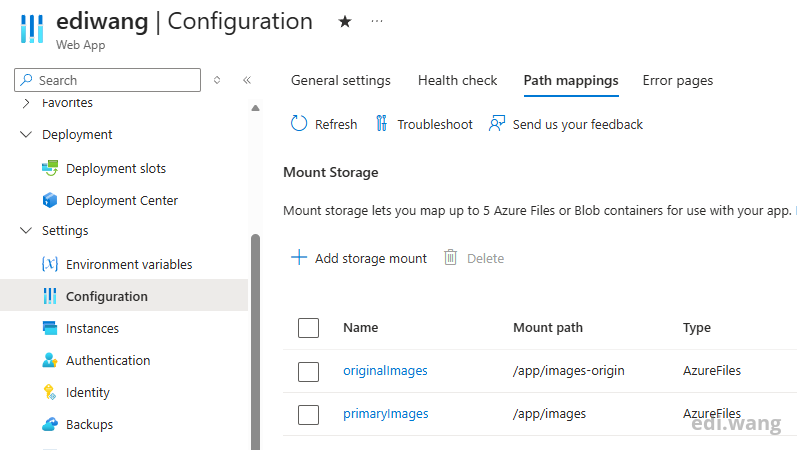
From Moonglade’s perspective, these are ordinary filesystem paths. App Service and Azure Files provide the persistent, shared storage behind them. This demonstrates the new architectural boundary clearly: the application remains platform-neutral while the deployment can still take full advantage of Azure’s managed infrastructure. Azure also supports configuring these mounts through the portal or Azure CLI, as described in the App Service storage-mount documentation.
CDN Delivery Remains Independent
Storage and image delivery are separate concerns.
Moonglade continues to store image references using URLs such as:
/image/example.webp
When CDN redirection is enabled, rendered posts and feeds use the configured CDN endpoint. Requests to the legacy application URL can also redirect to the CDN.
The browser retrieves the image directly from the CDN; the bytes do not need to pass through Moonglade.
This behavior did not require a cloud storage SDK before, and it does not require one now. The only important rule is that the CDN origin may expose the public image root, but never the private original-image root.
CDN caching, media types, invalidation, TLS, and origin access policies remain deployment responsibilities.
The Trade-Off
This design makes the application smaller and more portable, but it does not make storage operations disappear.
Operators must now ensure that:
- Both paths are writable and durable.
- Containers do not store images only in ephemeral layers.
- Multiple replicas share the same image data.
- Backups include both roots.
- The private original root is not publicly exposed.
- Mounted storage has acceptable consistency and performance.
I consider this a better trade-off. These concerns already existed; keeping cloud SDKs inside Moonglade merely distributed them across both application and infrastructure code.
The new architecture gives them a clear owner.
Upgrading Existing Installations
This is a breaking deployment change for installations using Azure Blob Storage, S3-compatible storage, or a single shared filesystem directory.
Existing images must be copied into the new roots before upgrading:
- Copy processed images into
FileSystemPath. - Copy retained originals into
OriginalFileSystemPath. - Preserve existing filenames.
- Configure both new paths.
- Remove the old provider settings and credentials.
- Verify persistence, permissions, and public/private isolation before restoring traffic.
Database records and saved post content do not require URL rewriting because /image/{filename} remains the stable application-level URL.
Moonglade deliberately does not perform this data migration automatically. Copying data between storage systems is an infrastructure operation with deployment-specific authentication, availability, and rollback requirements.
Conclusion
The most important outcome of this redesign is not simply that some SDK packages were removed. It is that Moonglade now has a clearer architectural boundary.
The application owns:
- Image validation and processing
- Filename generation
- Public and original image separation
- Image HTTP behavior
- CDN URL generation
The infrastructure owns:
- Durable storage
- Cloud-provider integration
- Shared access between replicas
- Mounting, backup, and recovery
- CDN origin configuration
Moonglade can still run on Azure, but Azure is no longer embedded in its image-storage code. The same application can run with Docker volumes, shared network storage, or another platform without introducing another provider implementation.
That is the real meaning of moving from Azure to anywhere.
Comments